
Welcome to SAP Introduction
SAP is one of the world’s leading enterprise software platforms used by organizations to manage and integrate their business processes. Businesses have different functions such as finance, purchasing, sales, production, inventory, quality, maintenance and human resources. An ERP system helps connect these functions so that information can flow between departments and business processes can work together.
If you are starting your SAP PP (Production Planning) journey, it is important to first understand the basics of SAP, ERP, SAP modules, SAP versions and how SAP PP fits into the overall SAP system. In this tutorial, we will understand these concepts step by step.
What is SAP?
SAP is the name of a global enterprise software company and its software ecosystem. SAP develops enterprise applications that help organizations manage and integrate different business processes.
The name SAP comes from the company’s original German name, Systemanalyse Programmentwicklung, which means System Analysis Program Development.
SAP was founded in 1972 by five former IBM employees: Dietmar Hopp, Hasso Plattner, Claus Wellenreuther, Klaus Tschira and Hans-Werner Hector.
The company initially focused on developing software that could help businesses process information in real time. Over the years, SAP evolved into a global provider of enterprise applications covering areas such as finance, procurement, manufacturing, sales, supply chain and human resources.
What is ERP?
ERP stands for Enterprise Resource Planning. ERP is a type of business software used to integrate and manage an organization’s major business processes.
A company may have different departments such as Sales, Purchasing, Production, Inventory, Quality, Finance, Maintenance and Human Resources. These departments are connected through business activities and information.
An ERP system helps connect these processes so that information can flow between departments instead of each department working with completely separate information.
Simple Manufacturing Example
Consider a manufacturing company that receives a customer requirement. The sales process creates the demand, production planning determines what needs to be produced, MRP determines the material requirements, purchasing procures externally required materials, production manufactures the product, inventory is updated, and the relevant financial information is integrated with Finance and Controlling.
This type of integration allows the organization to manage its business processes through a connected ERP system.
Why is ERP Important?
An integrated ERP system can help organizations connect their business processes, improve information visibility and manage business activities in a structured way.
Business Process Integration
Different departments can work with connected business processes instead of maintaining completely separate systems. Information created in one process can be used by another related process.
Centralized Information
An ERP system provides a common platform for managing business information. This can reduce duplicate data and make relevant information easier to access.
Better Visibility
Integrated information gives users and management a clearer view of business activities and helps them understand what is happening across different functions.
Improved Productivity
Integrated workflows and automation can reduce repetitive manual activities and help employees focus on important business tasks.
Better Decision-Making
Timely and reliable business information can help managers and users make better decisions based on the current situation of the organization.
Process Control
ERP systems allow organizations to define, standardize and monitor important business processes according to their business requirements.
SAP as an ERP Platform
SAP provides enterprise applications that support many different business functions. These functions work together to support the overall business processes of an organization.
Major SAP Functional Areas
| SAP Area | Full Name | Main Business Purpose |
| FI | Financial Accounting | Financial accounting and reporting |
| CO | Controlling | Management accounting and cost control |
| SD | Sales and Distribution | Sales and customer-related processes |
| MM | Materials Management | Purchasing and material/inventory processes |
| PP | Production Planning | Production planning and manufacturing |
| QM | Quality Management | Quality planning and inspection |
| PM | Plant Maintenance | Equipment and maintenance processes |
| HCM | Human Capital Management | Human resource processes |
These functional areas are not completely independent. They interact with each other during actual business processes. For example, a manufacturing process can involve SD, PP, MM, QM and FI/CO.
Understanding this integration is especially important for an SAP PP consultant because production planning depends on information and processes from several other areas.
SAP ERP Evolution
SAP has evolved significantly over the years as business requirements and technology have changed. Different generations of SAP software introduced improvements in architecture, functionality and system performance.
SAP R/2 → SAP R/3 → SAP ERP / ECC → SAP S/4HANA
For an SAP learner, it is useful to understand this evolution because many SAP professionals have experience with ECC systems, while SAP S/4HANA is the modern ERP generation used in current SAP implementations.
SAP R/2
SAP R/2 was an earlier generation of SAP enterprise software designed for mainframe environments. It was an important stage in the development of SAP’s integrated business software.
SAP R/3
SAP R/3 was a major development in SAP’s ERP history. It introduced a client-server architecture and became widely used by organizations for integrated business process management.
SAP ERP/ECC
SAP ERP, commonly associated with SAP ECC, became a widely used enterprise resource planning platform. It provided integrated functionality across areas such as Finance, Materials Management, Sales and Distribution, Production Planning and Quality Management.
SAP S/4HANA
SAP S/4HANA is SAP’s modern ERP generation. It is designed around the SAP HANA database and supports modern capabilities such as real-time processing, analytics and intelligent business processes.
SAP R/3 Three-Tier Architecture
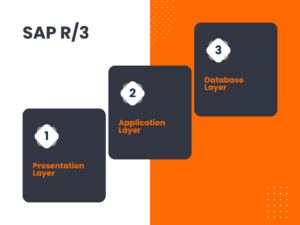
SAP R/3 is based on a three-tier architecture in which different responsibilities are separated into three layers. This architecture helped SAP process business transactions by separating the user interface, application processing and database storage.
Presentation Layer
The presentation layer is the user interface through which users interact with the SAP system. Users can enter information, execute transactions, display data and perform different business activities through the user interface.
Application Layer
The application layer contains the application logic that processes user requests and performs the required business operations. It communicates between the presentation layer and the database layer.
Database Layer
The database layer stores the business data required by the SAP system. The application layer accesses the database when information needs to be created, changed or retrieved.
The three layers work together to process business transactions. Although SAP technology has evolved significantly since R/3, understanding this architecture provides useful background for learners who encounter SAP R/3 and ECC systems.
“Learn more about SAP Introduction, visit the official website“
What is SAP PP?
SAP PP stands for Production Planning. It is the SAP application area that supports planning and managing manufacturing processes. SAP PP helps organizations determine what needs to be produced, how much needs to be produced, when production is required and what materials and resources are needed.
In a manufacturing organization, production cannot start simply by deciding to make a product. The organization needs to consider customer demand, available materials, production capacity, production resources, required dates and the sequence of manufacturing activities.
SAP PP provides processes and tools that help planners and production teams manage these activities in an integrated SAP environment. It connects production planning with other areas such as Sales and Distribution, Materials Management, Quality Management, Controlling and Plant Maintenance.
Why is SAP PP Important?
Manufacturing companies need to balance customer requirements with available materials, production capacity and delivery dates. Without proper planning, a company may face material shortages, excess inventory, production delays or unused production capacity.
SAP PP helps organize the production planning process by connecting demand, material requirements, production planning and production execution. This allows planners to make decisions based on the information available in the SAP system.
Simple SAP PP Example
Consider a company that manufactures a finished product. A customer requirement creates a demand for the product. The production planner needs to determine how many units must be produced and when they are required.
The system can then be used to determine the required components and materials, check material availability, plan production and create the necessary procurement or production proposals.
After planning is completed, production orders can be created and released for manufacturing. During production, material consumption and production confirmations are recorded, and the finished product can be received into inventory.
SAP PP and Other SAP Modules
SAP PP does not work as an isolated application. Production processes require information from several other SAP areas, and the results of production activities can also affect other business processes.
- SD – Sales and Distribution: Customer requirements and sales processes can create demand for production.
- MM – Materials Management: Supports procurement and material inventory processes.
- QM – Quality Management: Supports quality activities associated with materials and production.
- CO – Controlling: Supports production-related cost and controlling processes.
- PM – Plant Maintenance: Supports maintenance of production equipment and technical resources.
Understanding these integrations is important for an SAP PP consultant because a production process often crosses several SAP functional areas.
Key Functions of SAP PP
SAP PP covers several activities involved in production planning and manufacturing. The following functions provide a basic understanding of the major areas that we will study in detail in the upcoming SAP PP tutorials.
Demand Management
Demand Management deals with planning requirements for finished products and important assemblies. It helps the organization represent expected demand in the SAP system and supports different planning strategies.
Material Requirements Planning (MRP)
Material Requirements Planning determines the materials and quantities required to meet production requirements. MRP considers factors such as existing stock, requirements, open procurement or production proposals, lead times and lot-sizing information.
Capacity Planning
Capacity Planning helps planners evaluate whether sufficient capacity is available to carry out planned production activities. It can help identify overloaded work centers and support better production scheduling.
Production Planning
Production planning determines what products need to be produced, in what quantity and within which time period. It uses planning information and master data to support the manufacturing process.
Production Order Management
Production orders are used to control the manufacturing of a product. They contain important information such as the material to be produced, quantity, components, operations, work centers and scheduling information.
Production Execution
Production execution involves carrying out the planned manufacturing activities. Depending on the business process, this can include material consumption, operation confirmations and receipt of the manufactured product into inventory.
Integration with Other SAP Modules
SAP PP integrates with several other SAP areas. This integration allows information to flow between related business processes and helps maintain consistency across the organization.
- SAP SD – Sales and customer requirements
- SAP MM – Procurement and material management
- SAP QM – Quality management activities
- SAP CO – Production-related cost and controlling information
- SAP PM – Maintenance of production equipment
SAP PP Master Data
SAP PP relies on several important master data objects to plan and execute production. Master data provides the basic information that the system uses during production planning, material requirements planning and production execution.
Material Master
The Material Master contains important information about a material that is used across different SAP processes. In SAP PP, material-related planning information is important for production planning and MRP.
Bill of Material (BOM)
A Bill of Material defines the components required to manufacture a finished product or assembly. It provides the component structure that can be used during planning and production.
Work Center
A Work Center represents a production resource where manufacturing operations are performed. It can contain information related to capacity, scheduling and costing.
Routing
A Routing defines the sequence of operations required to manufacture a product. It specifies the operations involved and the work centers where those operations are performed.
Production Version
A Production Version can define which combination of production master data should be used for manufacturing a material. Depending on the scenario, it can link the relevant BOM and routing for production.
These master data objects work together during production planning and execution. Understanding their purpose is essential before learning the detailed SAP PP configuration and transactions.
Simplified SAP PP Process Flow
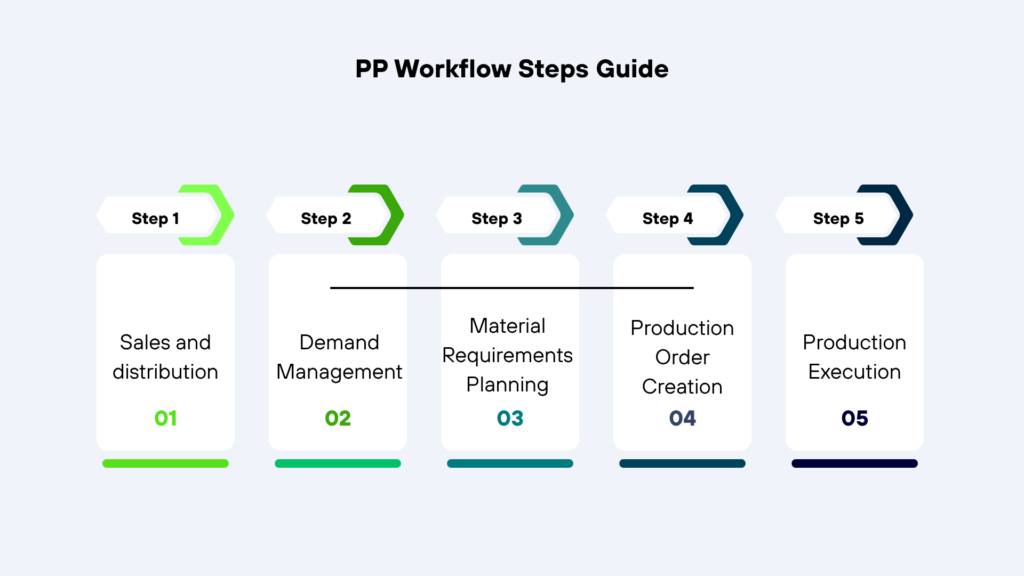
A typical production planning and execution process involves several connected activities. The exact process can vary depending on the organization’s business requirements, planning strategy and manufacturing process.
1. Demand – A requirement for a finished product is identified.
2. Demand Management – The requirement is represented in the planning process.
3. MRP – Material requirements are calculated.
4. Procurement / Production Proposal – The system determines whether materials need to be procured or produced.
5. Production Order – A production order is created for manufacturing.
6. Material Availability – Required components are checked and made available.
7. Production Execution – Manufacturing activities are carried out.
8. Goods Issue – Components consumed during production are posted.
9. Production Confirmation – Production activities are confirmed.
10. Goods Receipt – The manufactured product is received into inventory.
This is a simplified overview of the SAP PP process. Each step will be explained in greater detail with practical configuration examples and SAP screenshots in the upcoming tutorials.
What You Will Learn in the SAP PP Tutorials
The SAP PP learning path on FreeSAPLearning is designed to move from basic concepts to practical configuration and production processes.
1. SAP Introduction – Basic SAP, ERP, modules and SAP PP concepts.
2. Enterprise Structure – Organizational units and their relationships.
3. Master Data – Important PP master data and configuration.
4. Demand Management – Demand and planning strategies.
5. MRP – Material Requirements Planning and related configuration.
6. Production Order Execution – Production order creation and execution.
7. Inventory Management – Inventory movements related to production.
8. Capacity Planning – Capacity requirements and evaluation.
9. Shop Floor Control – Production execution and monitoring.
The tutorials will focus on practical learning using SPRO menu paths, transaction codes, configuration steps, examples and screenshots wherever applicable.
How the SAP PP Tutorials Are Structured
The upcoming configuration tutorials are designed to make SAP PP easier to understand for beginners and working professionals. Each topic will explain not only what to configure, but also why the configuration is required and how it is used in a business process.
Concept
First, the business concept and purpose of the configuration will be explained.
SPRO Menu Path
The relevant SAP configuration menu path will be provided so that you can navigate to the required configuration activity.
Transaction Code
Where applicable, the relevant transaction code will be provided for configuration or execution.
Configuration Steps
Configuration steps will be explained in sequence, with practical examples.
Screenshots
SAP screenshots will be included to show the actual configuration screens and important fields.
Practical Explanation
The configuration will be explained from a practical business-process perspective so that you can understand how it is used in a real SAP environment.
SAP PP Learning Path at FreeSAPLearning
FreeSAPLearning is designed to provide a structured learning path for SAP Production Planning. The tutorials will start with the basic concepts and gradually move towards organizational structure, master data, planning, MRP and production execution.
1. SAP Introduction – Understand SAP, ERP, SAP modules, versions and the basics of SAP PP.
2. Enterprise Structure – Learn the organizational units used in SAP and understand how they are related.
3. Master Data – Learn the important master data required for production planning.
4. Demand Management – Understand demand planning and planning strategies.
5. Material Requirements Planning (MRP) – Learn how MRP determines material requirements and planning proposals.
6. Production Order Execution – Learn production order creation, release and execution.
7. Inventory Management – Understand material movements related to production.
8. Capacity Planning – Learn how production capacity is evaluated and managed.
9. Shop Floor Control – Understand production execution and monitoring activities.
Each topic will be explained with practical examples and, wherever configuration is involved, step-by-step SAP screenshots, SPRO menu paths and relevant transaction codes.
What You Will Learn from These Tutorials
The objective of FreeSAPLearning is not only to explain SAP terminology, but also to help learners understand how SAP PP configuration is connected to actual manufacturing processes.
- Understand the business purpose of each configuration.
- Find the required configuration using the SPRO menu path.
- Understand relevant transaction codes.
- Follow configuration steps in the correct sequence.
- Understand important configuration fields.
- See practical SAP screenshots.
- Understand how different PP processes are connected.
- Understand integration with other SAP modules.
The detailed tutorials will be published topic by topic so that you can learn SAP PP in a structured manner without having to understand the entire SAP system at once.
Start Learning SAP PP
If you are new to SAP PP, the best approach is to follow the tutorials in sequence. Start with the SAP Introduction and Enterprise Structure, then continue with Master Data, Demand Management, MRP and Production Order Execution.
Each upcoming tutorial will focus on a specific topic and explain the concept before moving into practical SAP configuration wherever applicable.
Start your SAP PP learning journey with FreeSAPLearning and learn SAP Production Planning step by step.
Summary
In this tutorial, we introduced SAP and ERP and discussed how different SAP functional areas support an organization’s business processes. We also looked at the evolution from SAP R/2 and SAP R/3 to SAP ERP/ECC and SAP S/4HANA.
We then introduced SAP PP, its importance in manufacturing, its major functions, master data and its integration with other SAP modules.
SAP PP covers a wide range of activities, including Demand Management, MRP, Capacity Planning, Production Planning, Production Order Management and Production Execution. These topics will be explained in detail throughout the FreeSAPLearning SAP PP learning path.
Next Tutorial – Factory Calendar
The next tutorial is Factory Calendar in SAP.
A factory calendar determines the working days and non-working days that are relevant for business processes in SAP. It plays an important role in scheduling and planning activities.
In the next tutorial, we will explain the Factory Calendar concept and then configure it step by step using the SAP configuration menu path and screenshots.